


Insurance Product Manager — Multi-Country Edition
Basics of Tailor
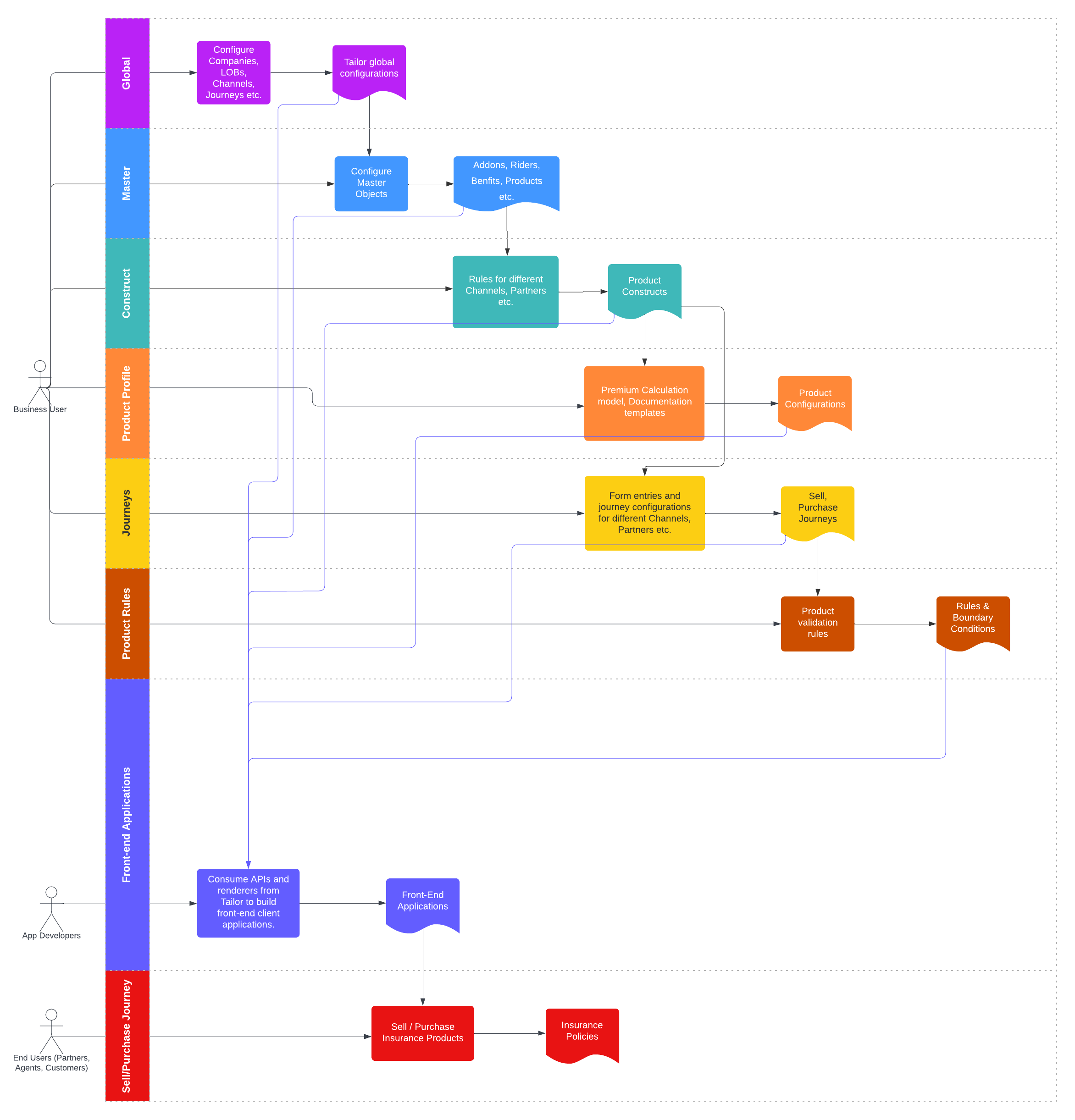
Tailor enables business users to create and configure insurance products on the fly, along with Addons, Riders, Benefits etc.
Tailor also helps configuring the products profile such as Premium Calculation model, documentation templates and so on.
With Tailor, business users create and configure products sell and purchase journeys, validation and boundary conditions and other configurations in order to make the product live in front-end channels.
All flows page describes all the application and usability flows of Tailor.
Tailor also helps configuring the products profile such as Premium Calculation model, documentation templates and so on.
With Tailor, business users create and configure products sell and purchase journeys, validation and boundary conditions and other configurations in order to make the product live in front-end channels.
All flows page describes all the application and usability flows of Tailor.
Tailor Building Blocks
Masters
In Tailor Insurance products comprises of five components - Addon, Rider, Benefit, Feature and Plan. All these masters are maintained per Insurance Company.
- AddonsAddons are the additional offerings that can be purchased optionally.
- Ridersare the further optional additions that can be purchased along with a product.
- Benefitsare the offerings that comes along with a product or plan.
- Featuresare essentially the product or plan construct in terms of what features a policy would entertain.
- Plansare different variations of a product. A product can have multiple plans or no plans at all.
- Productsare constructed using all or any of the above ingredients.
Journeys
Tailor orchestrates four different types of Journeys - Quick Quote, Get Recommendation, Proposal Form and Medical Questionnaire. Apart from Get Recommendation, all other journeys are company specific.
- Quick Quoteis product specific and to be used when the customer wants to get quotations for a particular product and plan of an Insurance Company with certain details entered.
- Get Recommendationis a journey when the customer is not sure which product to purchase and the system suggests or recommends some products basis the details entered and the configured rule sets.
- Proposal Formalso is company and product specific and is used to capture Application/Proposal Form of a customer for a particular policy.
- Medical Questionnairenormally comes after Proposal Form (in case of Health business only). This constructs the questions need to be asked from the customer for a particular product (and hence a particular company). Mostly applicable for Health Insurances.
- Build your PlanCustomize the Product or Plan as per customer's choice; such as changing the set of Addons/Riders etc, updating tenure, sum insured, or set of insured members etc.
Rules & Conditions
The Rule Engine of Tailor enables business users to configure product and plan rules, validations and boundary conditions. Apart from Get Recommendation rules, all other rules are company specific.
- Product Constructsare the rules that define the characteristics of a product. For example, Age Limits, Number of Members allowed, Sum Insured offered and so on.
- Product Rulesare the rules that define the characteristics of a product. For example, Age Limits, Number of Members allowed, Sum Insured offered and so on.
- Get Recommendation Rulesare the set of rules that governs and controls which all products and plans from which Insurance Companies are to be offered in a given set of customer inputs.
for Business Users
Product Owners, Underwriters, Business Team, API Generators.
Business users who create and configure Insurance Products, Rules and various Journeys.
Please login with suitable credentials.
for Application Developers
UI Developers, API Consumers.
Application/Portal developers who need the products to be consumed/displayed in their application.
As the client application developer (for example a portal or mobile app or API gateway), you need to invoke the services exposed from Tailor. Services return raw JSON data packets - you use those services if you wish to create your own user interface and experience with the data.
Quick Quote Masters Products Recommendationfor Administrators
Tailor Administrators.
Administrators can configure the full Tailor instance.
Please login with suitable credentials.